OdysseyUI

OS Portfolio Template

A developer portfolio template that looks and feels like a desktop operating system, inspired by posthog's website.
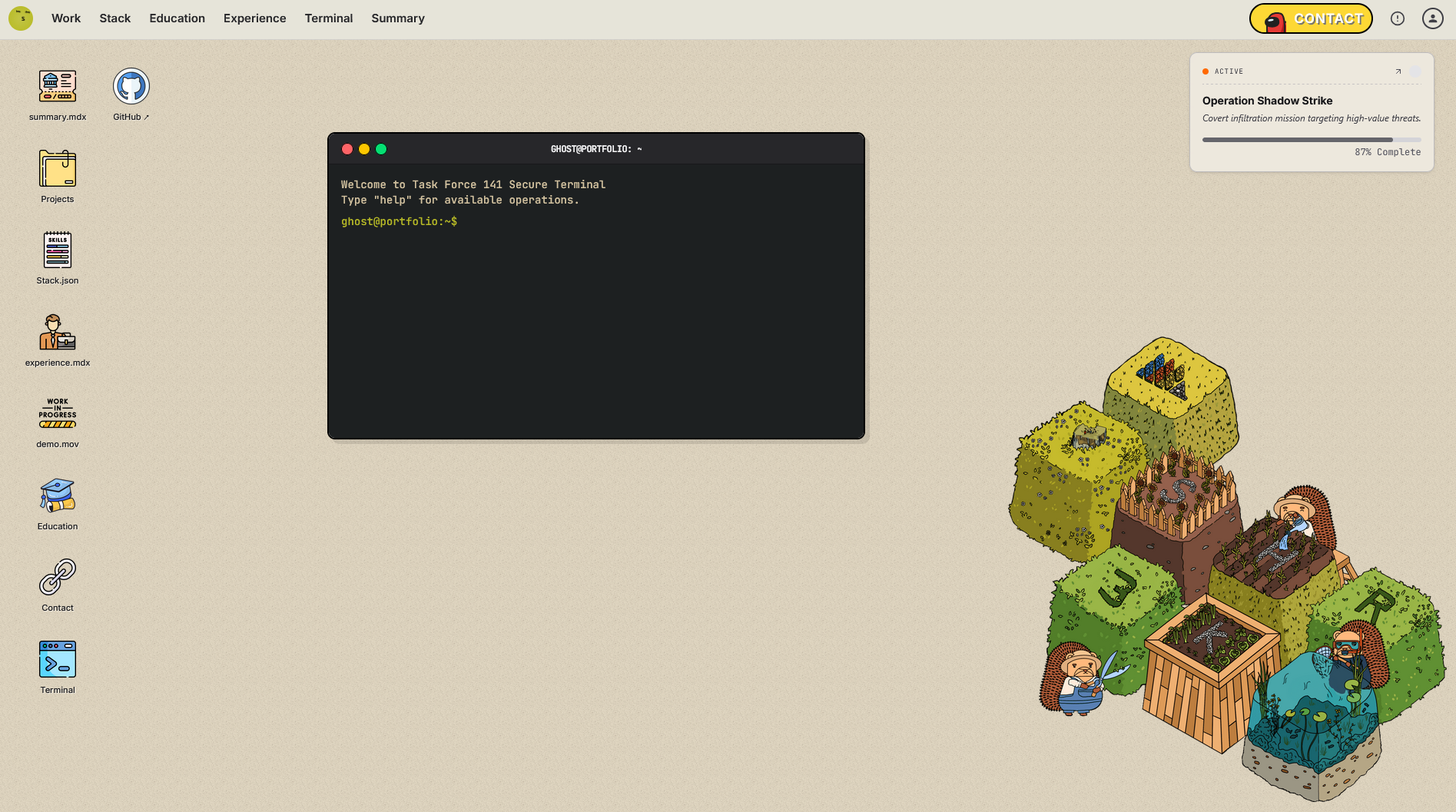
What is this?

A developer portfolio template that looks and feels like a desktop operating system. Built with Next.js 16, React 19, and Tailwind CSS v4 — featuring draggable windows, a macOS-style navbar, an interactive terminal, and a single config file to make it entirely your own.

Who is this for?

You are a developer who wants a portfolio that stands out. Instead of a standard scrolling page, this template gives your visitors a full desktop OS experience — complete with windows they can drag, resize, and maximize, a real terminal with commands, and an immersive UI that showcases your work in a memorable way.

Installation

Prerequisites

  • Node.js 18+
  • npm, yarn, pnpm, or bun

Clone Repository

git clone https://github.com/odysseyui-templates/odyssey-os-portfolio-template
cd os-portfolio-template

Install Dependencies & Run Dev Server

npm install
npm run dev

Features

  • Desktop OS UI — A full-screen desktop with draggable, resizable, and maximizable windows
  • Desktop Icons — Clickable icons that open corresponding windows (files, folders, apps, media, mail, terminal)
  • macOS-style Navbar — Dropdown navigation with grouped links to all sections
  • Interactive Terminal — A real command-line interface with commands like bio, skills, ops, contact, and github
  • Hero / Summary Window — Code-snippet style bio with avatar, role, specializations, and a "Now Building" progress widget
  • Projects Window — Image/video project cards with tags and links
  • Tech Stack Window — Badge grid of your technologies and skills
  • Experience Window — Work history with role, company, period, and bullet points
  • Education Window — Academic and certification details
  • Contact Window — Contact information panel
  • Demo Window — Embedded video/image showcase
  • Static Export Ready — Configured for output: "export" for easy deployment to GitHub Pages, Netlify, or Vercel

Tech Stack

LayerTechnology
FrameworkNext.js 16
UI LibraryReact 19
StylingTailwind CSS v4
ComponentsRadix UI Slot
IconsLucide React
Utilitiesclsx, tailwind-merge, class-variance-authority
LanguageTypeScript

Project Structure

├── global.config.ts       # ✅ Single file to configure all portfolio content
├── constants.tsx          # Desktop icons, window definitions, nav links
├── types.ts               # TypeScript interfaces (WindowState, Project, etc.)
├── app/
│   ├── page.tsx           # Main desktop page — window orchestration logic
│   ├── layout.tsx         # Root layout with metadata
│   └── globals.css        # Global styles and Tailwind imports
├── components/
│   ├── Window.tsx         # Draggable, resizable window shell
│   ├── Navbar.tsx         # macOS-style top navigation bar
│   ├── HeroContent.tsx    # Summary/bio window content
│   ├── ProjectGrid.tsx    # Project cards grid
│   ├── Terminal.tsx       # Interactive terminal emulator
│   ├── DesktopIcon.tsx    # Clickable desktop icon component
│   └── ui/
│       └── safari.tsx     # Safari-style browser frame component
└── public/                # Static assets

Customization

Everything you need to personalize is in a single file: global.config.ts

Personal Info

export const PERSONAL = {
  name: 'Your First Name',
  lastName: 'Your Last Name',
  fullName: 'Your Full Name',
  role: 'Your Job Title',
  email: 'you@example.com',
  github: 'https://github.com/your-username',
  githubUsername: 'your-username',
  avatar: 'https://link-to-your-avatar.jpg',
  heroBackground: 'https://link-to-hero-background.jpg',
  statusBadge: 'Open to Work',
  bio: 'A short bio about yourself.',
  specializations: ['Web Development', 'UI/UX', 'Open Source'],
  currentWork: 'Your current project or employer',
};

Hero Code Snippet

export const HERO_CODE_SNIPPET = {
  constName: 'YourName',
  focus: 'Your focus areas',
  experience: 'Your experience summary',
  goals: ['Goal 1', 'Goal 2', 'Goal 3'],
  tech: ['React', 'TypeScript', 'Node.js'],
  comment: '// Your personal tagline',
};

Projects

export const PROJECTS = [
  {
    id: 'my-project',
    title: 'My Awesome Project',
    description: 'What this project does.',
    tags: ['React', 'Next.js', 'API'],
    image: 'https://link-to-project-image.jpg',
    video: '', // Optional video URL
    link: 'https://your-project-link.com',
  },
];

Tech Stack / Skills

export const TECH_STACK = [
  'React',
  'TypeScript',
  'Node.js',
  'PostgreSQL',
  // ...add as many as you like
];

Work Experience

export const EXPERIENCE = [
  {
    company: 'Company Name',
    role: 'Your Role',
    period: 'Jan 2022 – Present',
    bullets: ['Key achievement or responsibility.', 'Another key achievement.'],
  },
];

Education

export const EDUCATION = [
  {
    institution: 'University Name',
    degree: 'B.Sc. Computer Science',
    period: '2018 – 2022',
  },
];

Terminal Commands

export const TERMINAL_CONFIG = {
  username: 'yourname',
  welcomeMessages: ['Welcome to my portfolio', 'Type "help" to get started.'],
  commands: {
    help: 'Available commands: bio, skills, contact, github, clear',
    bio: 'A brief terminal bio about you.',
    skills: 'Your comma-separated skill list.',
    contact: 'your@email.com',
    github: {
      message: 'Opening GitHub...',
      url: 'https://github.com/your-username',
    },
  },
};

Window IDs Reference

Each window is identified by a WindowId. You can control which windows open by default via defaultOpen in constants.tsx.

IDDefault TitleOpens by Default
herosummary.mdxNo
projectsProject ExplorerNo
stackTech StackNo
resumeexperience.mdxNo
aboutEducationNo
contactContact InformationNo
terminalusername@portfolio: ~Yes
demodemo.movNo

Built by Shr3kx & iam-sahil. The source code is available on GitHub.

Last updated: 3/16/2026